





























Catalog
Global
EN
Account
Steam Gifts
Steam Keys
Game Top-Up
Gift Cards
Full catalog
Steam Gifts
Steam Keys
Game Top-Up
Gift Cards
Back
Call of Duty®: Black Ops III - C.O.D.E. Warriors Personalization Pack (DLC)

Call of Duty®: Black Ops III - C.O.D.E. Warriors Personalization Pack (DLC)

Steam gift
In stock

In stock

36

Sales

0

Reviews

Supported languages

English* French*, Italian*, German*, Spanish - Spain*, Simplified Chinese, Traditional Chinese, Japanese, Polish, Portuguese - Brazil, Russian* *languages with full audio support

Activation platform

Steam

Action
Adventure
Single-player
Multi-player
This DLC requires the full base game «Call of Duty®: Black Ops III». The game must be in your account and not hidden.

Supported languages

English* French*, Italian*, German*, Spanish - Spain*, Simplified Chinese, Traditional Chinese, Japanese, Polish, Portuguese - Brazil, Russian* *languages with full audio support

Activation platform

Steam

Action
Adventure
Single-player
Multi-player

This DLC requires the full base game «Call of Duty®: Black Ops III». The game must be in your account and not hidden.
Screenshots
Call of Duty®: Black Ops III - C.O.D.E. Warriors Personalization Pack (DLC)
Description
System requirements

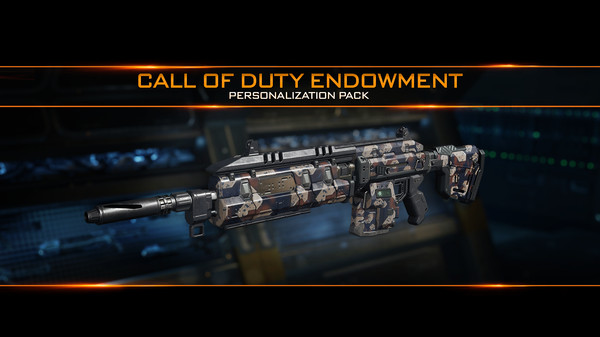
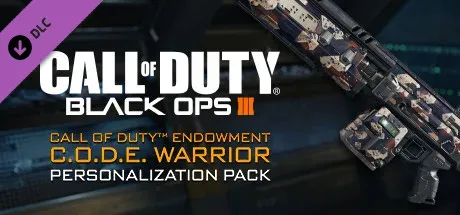
The Call of Duty Endowment (C.O.D.E.) Warriors Personalization Pack includes an exclusive weapon skin, three reticles and an all-new C.O.D.E. Warriors Calling Card.

This pack suits players who enjoy customizing their gear and want their weapons to stand out in multiplayer. The mood is laid back and a bit meaningful: you get new cosmetics for your arsenal while knowing part of the money helps veterans get back into steady work. What to expect: - An exclusive weapon camo that isn't in the standard bundles, so your loadout looks different from everyone else's. - Three extra scopes to try out different ways of aiming in combat. - A brand new C.O.D.E. Warriors calling card that shows off your profile in the game. - All of Activision's revenue from this pack goes straight to fighting veteran unemployment. To buy Call of Duty®: Black Ops III - C.O.D.E. Warriors Personalization Pack (DLC) as a Steam gift, send us your Steam quick invite link. We'll add you as a friend and send the pack to your account as a gift, and you just accept it. The Call of Duty Endowment (C.O.D.E.) Warriors Personalization Pack includes an exclusive weapon skin, three reticles and an all-new C.O.D.E. Warriors Calling Card. When you purchase the C.O.D.E. Warriors Pack, you’re helping Veterans find meaningful employment after leaving service. 100% of all Activision proceeds of the C.O.D.E. Warriors Pack will go directly to help combat Veteran unemployment. Visit to learn more.

System requirements

Minimum: - OS *: Windows 7 64-Bit / Windows 8 64-Bit / Windows 8.1 64-Bit - Processor: Intel® Core™ i3-530 @ 2.93 GHz / AMD Phenom™ II X4 810 @ 2.60 GHz - Memory: 6 GB RAM - Graphics: NVIDIA® GeForce® GTX 470 @ 1GB / ATI® Radeon™ HD 6970 @ 1GB - DirectX: Version 11 - Network: Broadband Internet connection - Storage: 60 GB available space - Sound Card: NVIDIA® GeForce® GTX 470 @ 1GB / ATI® Radeon™ HD 6970 @ 1GB

FAQ

Yes, the full version of Call of Duty®: Black Ops III must be on your account and must not be hidden. Without it the DLC gift cannot be sent.

After payment our bot adds you as a friend using your quick invite link and sends the gift. Accept it in your Steam notifications and the DLC will appear in your library.

In Steam open Friends → Add a Friend and copy your quick invite link. Each link works once, so create a new one for every order.

The region your Steam account is registered in. A gift for another region cannot be accepted.

Order information

Genre
Action, Adventure, Single-player, Multi-player, Co-op
Platform
Steam

Where to get the link?
  1. Open Steam and go to "Friends" -> "Add a Friend"
  2. In the "Quick Invite Link" section, click "Copy"
  3. Paste the link here. It is one-time use: create a new one for each order
+5

4.89 USD

Order information
Genre
Action, Adventure, Single-player, Multi-player, Co-op
Platform
Steam

Where to get the link?
  1. Open Steam and go to "Friends" -> "Add a Friend"
  2. In the "Quick Invite Link" section, click "Copy"
  3. Paste the link here. It is one-time use: create a new one for each order
+5

Secure transactions

All payments are protected by modern encryption and processed by trusted payment partners.

24/7 Support

Our support team works around the clock and is ready to help with purchases, payments, and any questions.

Full refund guarantee

In case of any issues with your order, we guarantee a refund according to our refund policy.

We use cookies to keep the site working and to remember your settings. Analytics cookies are only used with your consent. Learn more