
























Catalog
Global
EN
Account
Steam Gifts
Steam Keys
Game Top-Up
Gift Cards
Full catalog
Steam Gifts
Steam Keys
Game Top-Up
Gift Cards
Back
Screenshots
X-Plane 11 - Add-on: Aerosoft - Airport Zurich V2 (DLC) X-Plane 11 - Add-on: Aerosoft - Airport Zurich V2 (DLC) X-Plane 11 - Add-on: Aerosoft - Airport Zurich V2 (DLC) X-Plane 11 - Add-on: Aerosoft - Airport Zurich V2 (DLC) X-Plane 11 - Add-on: Aerosoft - Airport Zurich V2 (DLC) X-Plane 11 - Add-on: Aerosoft - Airport Zurich V2 (DLC) X-Plane 11 - Add-on: Aerosoft - Airport Zurich V2 (DLC) X-Plane 11 - Add-on: Aerosoft - Airport Zurich V2 (DLC) X-Plane 11 - Add-on: Aerosoft - Airport Zurich V2 (DLC) X-Plane 11 - Add-on: Aerosoft - Airport Zurich V2 (DLC) X-Plane 11 - Add-on: Aerosoft - Airport Zurich V2 (DLC) X-Plane 11 - Add-on: Aerosoft - Airport Zurich V2 (DLC) X-Plane 11 - Add-on: Aerosoft - Airport Zurich V2 (DLC) X-Plane 11 - Add-on: Aerosoft - Airport Zurich V2 (DLC) X-Plane 11 - Add-on: Aerosoft - Airport Zurich V2 (DLC) X-Plane 11 - Add-on: Aerosoft - Airport Zurich V2 (DLC) X-Plane 11 - Add-on: Aerosoft - Airport Zurich V2 (DLC) X-Plane 11 - Add-on: Aerosoft - Airport Zurich V2 (DLC) X-Plane 11 - Add-on: Aerosoft - Airport Zurich V2 (DLC) X-Plane 11 - Add-on: Aerosoft - Airport Zurich V2 (DLC)
Description
System requirements

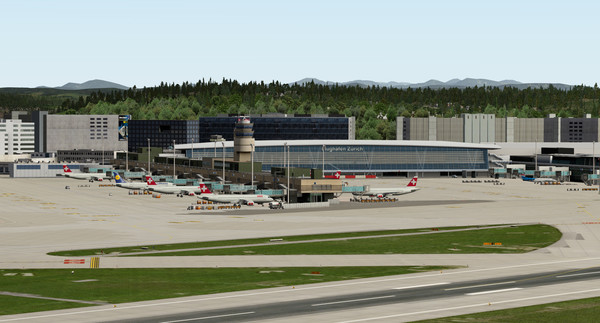
The Airport Zurich (previously Zurich-Kloten) is the largest airport of Switzerland, now in a brand new version for X-Plane. This completely new scenery is full of details, including every building and the entire airport environment, De-Icing and all features you would expect from a modern scenery for X-Plane.

This add-on is for people who enjoy long approaches and want to fly over a real airport rather than a generic runway. Zurich is big, busy, and full of character, and the developers clearly tried to capture that feel. What to expect: - Your first hours will go to taxiing: the layout is complex, the stands and taxiways are marked precisely, and it is easy to lose track while hunting for the right turn. - Night flights look especially good here: the baked lighting and X-Plane's HDR rendering make evening arrivals genuinely atmospheric. - Buildings, jet bridges, and ground vehicles are detailed, and some 2K textures show up nicely up close. - The scene is optimized, so high frame rates on decent hardware are realistic. To buy X-Plane 11 - Add-on: Aerosoft - Airport Zurich V2 (DLC) as a Steam gift, place your order and send us your Steam friend invite link. The bot will add you as a friend and send the game to your account as a gift, and the add-on will appear in your library. Make sure your account already owns X-Plane 11, or the add-on won't run. The Airport Zurich (previously Zurich-Kloten) is the largest airport of Switzerland, now in a brand new version for X-Plane. This completely new scenery is full of details, including every building and the entire airport environment, De-Icing and all features you would expect from a modern scenery for X-Plane. The ground layout has been created from scratch based on high resolution aerial images and it complies with the current data of the charts. The development of the airport facilities meets the state of late 2015 as well. The buildings and objects in this scenery were modeled with numerous 3D details and photo realistic textures; in some parts, even high resolution 2K textures were used. A multitude of animations for the radar systems, windsocks, airport traffic and more move this airport even closer to its real counterpart. The faithful signage and lighting of all taxiways and runways round off this impression. And thanks to baked textures in combination with X-Plane’s HDR rendering, Airport Zurich will shine at night as well with excellent effects. Despite all the features and complexity, great attention has been paid to the performance of this airport so it can be shown with a good frame rate. - Newly created buildings and objects with lots of 3D details, partly high resolution 2K textures - New transparent boarding bridges with glass sides at every gate - Updated taxiways and parking positions, as creating parking positions for the Airbus A380 changed other positions and moved lots of taxiway markings - Parking position E67 at Dock E now includes a separate, elevated boarding bridge - Static Airbus A380 of Emirates Airline, parking at Gate E67 - Terminal 2 was recently rebuilt and was finished by the end of 2015 - we already completely finished the terminal for this scenery - Enhanced Apron P with additional parking positions - Jet engine test site with new, large noise absorption hall - The entrances to terminals 1 and 2 were recently rebuilt - we already completely finished the reconstruction for this scenery, including a new roofing Additional features: - Completely created scenery of Airport Zurich for X-Plane 10, state of late 2015 - Detailed representation of the airport - Photo realistic ground textures based on aerial images (0,5m/pixel) - All buildings and airport facilities - Photo real textures for buildings, vehicles etc. - Complete taxiway and runway signage - “High speed taxiways”, allowing for exiting the runway at high speeds - Great night effects (baked textures + X-Plane 10 HDR) - Animated radar systems and wind hoses - Animated vehicle traffic at and around the airport - True to original runway and taxiway lighting - Traffic routes with ground traffic signage - Optimised for good performance (frame rate) - Custom Mesh for the Airport Area - Animated De-icing Trucks east of Terminal E - VFR Helper - Gates A44, A47, A48, A49, A55 with animated Jetways (installed AutoGate Version is needed)

System requirements

Minimum: - Requires a 64-bit processor and operating system - OS: 7/8/8.1/10 - Processor: MultiCore Processor with 3 GHz or faster - Memory: 8 GB RAM - Graphics: 3D graphics card with at least 2GB (4GB or higher is recommended) - Storage: 3 GB available space Recommended: - Requires a 64-bit processor and operating system

FAQ

Yes, the full version of X-Plane 11 must be on your account and must not be hidden. Without it the DLC gift cannot be sent.

After payment our bot adds you as a friend using your quick invite link and sends the gift. Accept it in your Steam notifications and the DLC will appear in your library.

In Steam open Friends → Add a Friend and copy your quick invite link. Each link works once, so create a new one for every order.

The region your Steam account is registered in. A gift for another region cannot be accepted.

Order information

Genre
Simulation, Single-player, Online PvP, Shared/Split Screen PvP, Downloadable Content
Platform
Steam

Where to get the link?
  1. Open Steam and go to "Friends" -> "Add a Friend"
  2. In the "Quick Invite Link" section, click "Copy"
  3. Paste the link here. It is one-time use: create a new one for each order
+34

33.13 USD

Order information
Genre
Simulation, Single-player, Online PvP, Shared/Split Screen PvP, Downloadable Content
Platform
Steam

Where to get the link?
  1. Open Steam and go to "Friends" -> "Add a Friend"
  2. In the "Quick Invite Link" section, click "Copy"
  3. Paste the link here. It is one-time use: create a new one for each order
+34

Secure transactions

All payments are protected by modern encryption and processed by trusted payment partners.

24/7 Support

Our support team works around the clock and is ready to help with purchases, payments, and any questions.

Full refund guarantee

In case of any issues with your order, we guarantee a refund according to our refund policy.

We use cookies to keep the site working and to remember your settings. Analytics cookies are only used with your consent. Learn more